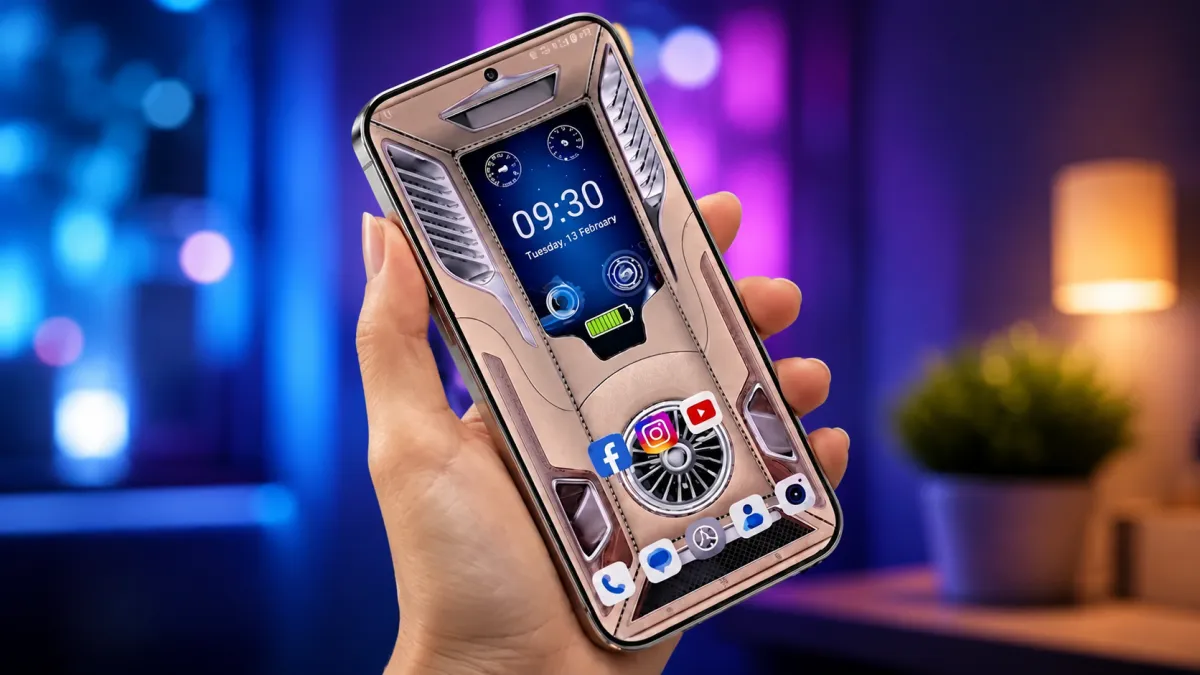
Personalizing an Android smartphone has become easier thanks to apps that combine eye-catching wallpapers with practical home screen tools. Instead of using a basic static background, many users now prefer live wallpaper apps that include animated effects, digital clocks, battery indicators, and charging animations.
These apps not only improve the appearance of your device but also place useful information directly on the home or lock screen, making everyday use more convenient.
Also read: Gesture Lock Screen: A Unique Way to Secure Your Android Phone
What Makes 3D Live Wallpaper Apps Popular?
Modern live wallpaper apps offer much more than animated backgrounds. Many applications now combine visual customization with useful widgets, allowing users to create a stylish yet functional smartphone experience.
Common features available in many apps include:
- Animated 3D wallpapers
- Parallax motion effects
- Digital and analog clock widgets
- Battery level indicators
- Charging animations
- Date and calendar display
- Weather information (in supported apps)
- Home screen customization options
Together, these features help create a personalized interface while keeping important information visible throughout the day.
Upgrade Your Home Screen With Animated Wallpapers
One of the main reasons Android users install live wallpaper apps is to make their devices look more modern.
Many wallpapers include smooth animation effects and layered designs that create a sense of depth. Some also respond to the movement of the phone, producing a subtle parallax effect that gives the background a more realistic appearance.
These visual enhancements can refresh the overall look of your device without changing how Android functions.
View Useful Information Without Opening Apps
Several live wallpaper applications include built-in widgets that display essential information directly on the home screen.
Depending on the app, users may be able to see:
- Current time
- Battery percentage
- Charging status
- Date and day
- Weather updates
Having these details available at a glance reduces the need to repeatedly open separate applications.
Customize the Layout to Match Your Style
Most live wallpaper apps include various personalization settings so users can design a home screen that reflects their preferences.
Customization options often include:
- Switching between digital and analog clocks
- Moving widgets to different positions
- Changing text colors
- Selecting different fonts
- Adjusting animation speed
- Applying blur or lighting effects
- Choosing different wallpaper collections
These settings allow users to build a unique interface without requiring advanced customization skills.
Popular Features Found in Live Wallpaper Apps
Animated 3D Backgrounds
Many apps include high-resolution animated wallpapers with smooth transitions and depth effects. HD and Full HD wallpaper collections are commonly available for different screen sizes.
Built-In Clock Widgets
Clock widgets are available in multiple styles, including both digital and analog designs. Some apps also allow users to modify the size, font, and appearance of the clock to better match their wallpaper.
Battery Information
Battery widgets can display useful details such as:
- Remaining battery percentage
- Charging progress
- Low battery notifications
- Basic battery status
This information can be viewed without opening the device’s battery settings.
Charging Screen Effects
Charging animations have become one of the most popular personalization features on Android devices.
Depending on the application, users may see:
- Animated charging rings
- Glowing battery effects
- Energy flow animations
- Futuristic charging graphics
- Neon charging themes
These visual effects activate automatically when the charger is connected.
Benefits of Using Live Wallpaper Apps
A well-designed live wallpaper app offers several advantages beyond appearance.
Some benefits include:
- A modern and attractive home screen
- Easy access to important information
- Personalized layouts and widgets
- Compatibility with most Android devices
- Simple installation and setup
Many newer apps are also optimized to minimize battery consumption compared to older live wallpaper applications.
Who Can Benefit From These Apps?
Live wallpaper apps are suitable for a wide range of Android users, including:
- Android customization enthusiasts
- Mobile gamers
- Social media creators
- Students
- Users who enjoy aesthetic phone setups
- Anyone who prefers quick access to clock and battery information
Whether you prefer a minimal design or colorful animated themes, there are options available for different styles.
An App Worth Exploring
One Android app that offers a combination of wallpapers and useful widgets is 3D Wallpaper Clock Widget HD.
Depending on the version available on Google Play, the app may include features such as:
- Animated 3D wallpapers
- Clock widgets
- Battery indicators
- Charging animations
- Home screen customization tools
Before downloading any app, it’s recommended to review its latest ratings, permissions, feature list, and user feedback on the Google Play Store.
Tips for Choosing a Good Live Wallpaper App
Not every wallpaper app delivers the same experience. Some applications may use more system resources or display excessive advertisements.
When selecting an app, look for:
- Positive user reviews
- Frequent updates
- Reliable developer support
- Smooth performance
- Reasonable permission requests
Reading recent reviews can also help identify compatibility or performance issues before installation.
Also read: Battery Charging Animation App for Android: Enjoy 3D Effects and Live Charging Wallpapers
Final Thoughts
3D live wallpaper apps provide an easy way to personalize Android devices while adding practical features like clock widgets, battery indicators, and charging animations. By combining attractive visuals with everyday functionality, these apps can make your smartphone feel both stylish and more convenient to use.
For the best overall experience, choose a lightweight application that is regularly updated and optimized for your device. Using balanced animation settings can help maintain smooth performance while still enjoying a visually appealing Android home screen.

I am a passionate Tech Writer with strong industry experience. I enjoy exploring the latest technological innovations and sharing clear, helpful insights with my audience.