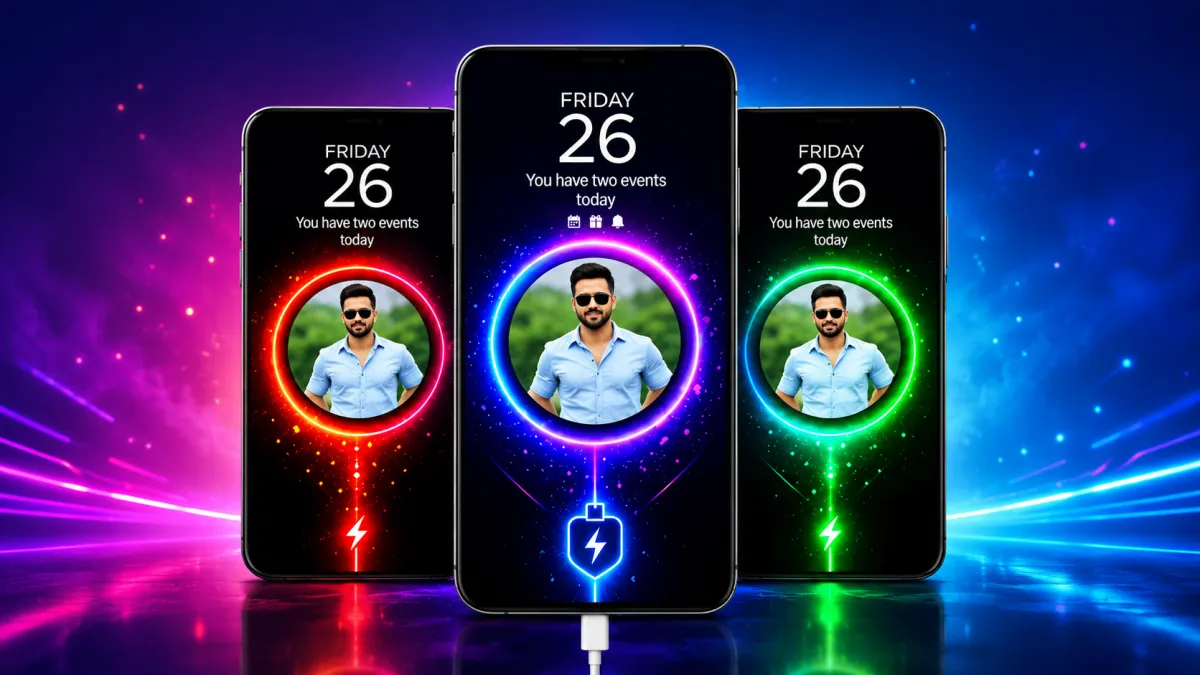
Android users have always enjoyed the freedom to customize their smartphones. From unique wallpapers and icon packs to lock screens and widgets, personalization has become an important part of the Android experience. Recently, charging screen customization has also gained popularity, allowing users to replace the default charging display with creative animations and visual effects.
Batix – Charging Photo is one such Android app that focuses on transforming the charging screen into something more visually appealing. With support for custom photos, animated effects, and stylish themes, the app offers a different way to personalize your device while it charges.
What Is Batix – Charging Photo?
Batix – Charging Photo is an Android customization app designed to display customized charging screens whenever a charger is connected to the device. Instead of showing the standard battery icon, the app allows users to apply personal images, animated themes, and visual effects to create a more engaging charging experience.
The app is mainly intended for users who enjoy smartphone personalization and want their device to reflect their individual style.
Turn Your Favorite Photos Into Charging Screens
One of the most appealing features of Batix is the ability to use personal photos as part of the charging animation.
Users can choose images from their device gallery and display them on the charging screen. This could include:
- Family photographs
- Selfies and portraits
- Pet photos
- Travel memories
- Favorite personal images
By combining these photos with animated effects, the charging screen feels more personal and unique.
Explore High-Quality Charging Themes
The app includes a collection of charging themes designed to enhance the visual appearance of Android devices. Many of these themes focus on vibrant colors, modern designs, and animated effects.
Popular theme categories may include:
- Neon-inspired designs
- RGB-style effects
- Technology-themed visuals
- Abstract animations
- Futuristic concepts
- Luxury-inspired themes
These themes are particularly attractive on devices with high-resolution displays.
Animated Charging Effects for a Dynamic Look
Instead of a static battery icon, Batix provides animated charging visuals that activate automatically when the device starts charging.
Users can experience effects such as:
- Energy flow animations
- Battery charging motion effects
- Neon lighting visuals
- Dynamic charging indicators
- Creative battery animations
These effects help make the charging process feel more interactive and visually appealing.
Battery Information at a Glance
In addition to visual customization, the app may also display useful charging-related information directly on the charging screen.
Depending on the version and device compatibility, users may be able to view:
- Current battery percentage
- Charging status
- Charging progress
- Battery condition information
- Estimated charging details
This allows users to monitor charging activity without opening additional apps.
Simple Setup and Easy Customization
Batix is designed for users who want a straightforward customization experience. The setup process is simple and does not require advanced technical knowledge.
A typical setup involves:
- Opening the application
- Choosing a charging theme
- Selecting a personal photo (optional)
- Applying animation effects
- Enabling the charging screen feature
Once configured, the custom charging display appears automatically whenever the device is connected to power.
Modern Neon and RGB Visual Effects
Neon and RGB-style designs remain popular among Android enthusiasts, especially among users who enjoy gaming-inspired aesthetics.
Batix includes various visual styles that feature:
- Neon outlines
- Colorful RGB lighting effects
- Futuristic animations
- Dynamic glow effects
These themes can help give the charging screen a modern and eye-catching appearance.
Designed for Everyday Android Users
Many customization apps become difficult to use because of complicated settings and excessive features. Batix focuses on keeping the user experience simple while still offering a variety of customization options.
The app may appeal to:
- Android customization enthusiasts
- Users who enjoy personalized themes
- Mobile gamers
- Social media users
- People looking for creative charging screens
Its easy-to-navigate interface makes it accessible for both new and experienced Android users.
Performance and Resource Usage
One common concern with charging animation apps is their impact on device performance.
In general:
- Animated effects may use additional screen resources
- High-resolution animations can consume more power while displayed
- Performance depends on device hardware and optimization
- Lightweight themes often provide smoother operation on older devices
Users can usually achieve the best balance by choosing moderate visual effects that match their device’s capabilities.
Installation and Availability
Batix – Charging Photo can be installed directly from the Google Play Store.
Before downloading any application, it is a good idea to:
- Review app permissions
- Read recent user feedback
- Check developer information
- Install only from trusted sources
These steps help ensure a safer and more reliable experience.

Important Things to Keep in Mind
Charging animation apps are primarily designed for visual customization. While they improve the appearance of the charging screen, they do not provide hardware-level improvements.
Apps like Batix cannot:
- Increase charging speed
- Improve battery lifespan
- Boost device performance
- Upgrade battery capacity
Their primary purpose is to enhance the visual experience during charging.
Final Verdict
Batix – Charging Photo offers Android users a creative way to personalize their charging screens with custom images, animated effects, and modern visual themes. The ability to combine personal photos with stylish charging animations helps make the device feel more unique and engaging.
For users who enjoy smartphone customization and want a more attractive charging display, Batix provides several useful personalization options. While it should be viewed as a visual enhancement tool rather than a performance app, it can still add an extra layer of creativity to the overall Android experience.

I am a passionate Tech Writer with strong industry experience. I enjoy exploring the latest technological innovations and sharing clear, helpful insights with my audience.
Advertisements