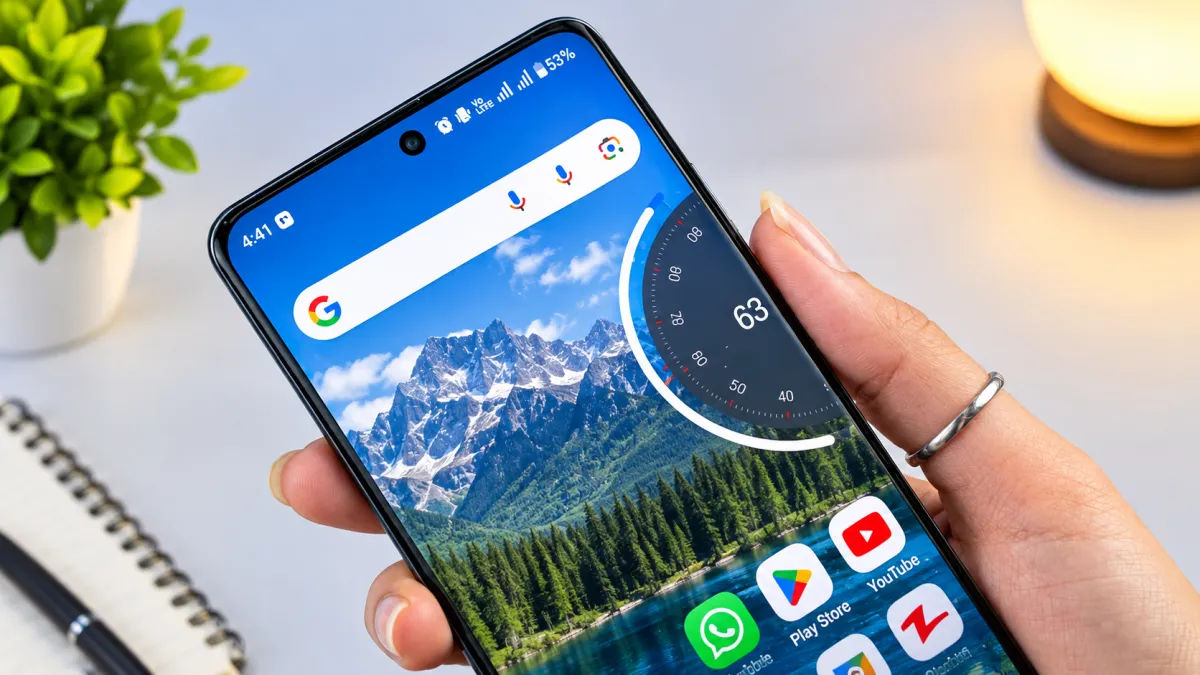
The volume panel is one of the most frequently used parts of a smartphone, yet it often receives little attention when people customize their devices. While users regularly change wallpapers, icons, and themes, the default volume interface usually remains unchanged.
NoVolume is designed for users who want to change that. The app replaces the standard volume control interface with a cleaner and more modern-looking alternative inspired by the visual design associated with Nothing OS.
Instead of making major changes to the phone’s interface, NoVolume focuses on one small but frequently used element—the volume panel.
Also Read: Gesture Apps for Android: Create Custom Shortcuts with Simple Drawings
What Is NoVolume?
NoVolume is an Android customization app that changes the appearance of the volume controls on a compatible smartphone.
Its main purpose is to provide a more minimal and polished volume interface while keeping the basic controls easy to access. Users can also customize certain visual elements to make the volume panel better match their preferred style.
The exact features and compatibility can vary depending on the phone and Android version.
What Makes NoVolume Interesting?
The main attraction of NoVolume is its focus on a specific part of the Android interface. Rather than installing a complete launcher or theme, you can use it to give the volume controls a different appearance.
Some of its notable aspects include:
- Minimal and modern interface
- Nothing OS-inspired visual style
- Smooth animations
- Customization options
- Haptic feedback on supported devices
- Lightweight approach
Key Features of NoVolume
1. Clean and Minimal Volume Panel
NoVolume replaces the traditional volume interface with a more modern design. The cleaner layout can make volume adjustments look less cluttered while keeping the controls easy to understand.
For users who prefer minimalist smartphone interfaces, this can be a noticeable visual improvement.
2. Smooth Visual Effects
The app adds animations when adjusting volume levels. These small effects can make the interaction feel more polished compared with a basic system volume panel.
The smoothness may depend on your phone’s hardware and Android software.
3. Haptic Feedback
On compatible devices, NoVolume can provide vibration feedback while changing the volume.
This can make volume adjustments feel more responsive, although the availability and behavior of haptic feedback may differ between smartphones.
4. Customization Options
Another useful aspect is the ability to personalize the volume interface.
Depending on the version and device, users may be able to adjust elements such as:
- Position
- Size
- Appearance
- Visual style
These settings give users more control over how the volume panel appears on their screen.
5. Designed for Everyday Use
NoVolume focuses on a function that people use regularly. Once configured, the customized panel can appear whenever you adjust your phone’s volume, allowing the new design to become part of your normal smartphone experience.
How to Set Up NoVolume
Getting started is generally straightforward.
Step 1: Install the App
Download NoVolume from a trusted source. If the app is available for your device through the Google Play Store, that is generally the preferred installation method.
Step 2: Check the Required Permissions
Open the app and review the permissions it requests.
Depending on how the application works on your Android version, it may require special access to display or control the custom volume interface.
Only enable permissions that you understand and that are necessary for the app’s features.
Step 3: Enable the Custom Volume Panel
Follow the instructions shown inside the application to activate the replacement volume interface.
You may need to enable a particular Android setting or service before the custom controls start working.
Step 4: Customize the Appearance
Once the feature is active, explore the available customization settings.
Adjust the position, size, or other visual options according to your preference.
What Is the User Experience Like?
After configuration, the main difference becomes visible whenever you press the volume buttons.
Instead of the phone’s standard volume panel, the customized interface appears with its own visual design and animations.
The overall experience focuses on:
- Simple controls
- Clean appearance
- Quick response
- Modern visual effects
- Personalization
For someone who enjoys changing small details throughout the Android interface, this can be a fun way to refresh the phone without replacing the entire launcher or theme.
Performance and Battery Considerations
Like other customization applications, NoVolume may use some system resources depending on how it operates on your device.
The actual impact can vary based on factors such as:
- Phone hardware
- Android version
- App version
- Enabled features
- Background services
If you notice unusual battery consumption, lag, or other issues after installation, check the app’s settings and Android’s battery usage section.
Privacy and Permissions
Before using any third-party customization app, it is important to review its permissions and privacy information.
Some system-level customization features may require special Android access to display overlays or interact with system controls. This does not automatically mean an app is unsafe, but users should understand what access they are granting.
Download the app from a trusted source and check its developer information, privacy policy, and permissions before enabling additional access.
Who Should Try NoVolume?
NoVolume may appeal to Android users who:
- Enjoy customizing their phone
- Prefer minimalist interfaces
- Like the Nothing OS-inspired design style
- Want to change the default volume panel
- Enjoy experimenting with small interface improvements
However, if you’re already happy with your phone’s default volume controls, there may be little reason to install an additional customization app.
Pros and Cons
Advantages
- Modern-looking volume interface
- Simple and easy to use
- Customization options
- Smooth visual effects
- Focuses on one specific part of the Android UI
Possible Limitations
- Compatibility may differ between devices
- Some features may depend on the Android version
- Additional permissions may be required
- Performance and battery impact can vary
Official Play Store App Link
Final Thoughts
NoVolume takes a simple approach to Android customization by focusing on the volume control interface instead of changing the entire smartphone experience.
Its minimalist design, animations, and customization options can give the familiar volume panel a fresh appearance. For users who enjoy Nothing-inspired visuals or simply want more control over small elements of their Android interface, the app can be an interesting option.
Before installing it, check device compatibility, review the required permissions, and download the app from a trusted source. A small change like a redesigned volume panel may not transform your phone completely, but it can make everyday interactions feel a little more personalized.

I am a passionate Tech Writer with strong industry experience. I enjoy exploring the latest technological innovations and sharing clear, helpful insights with my audience.
1 thought on “NoVolume App Review: Give Your Android Volume Controls a Fresh New Look”